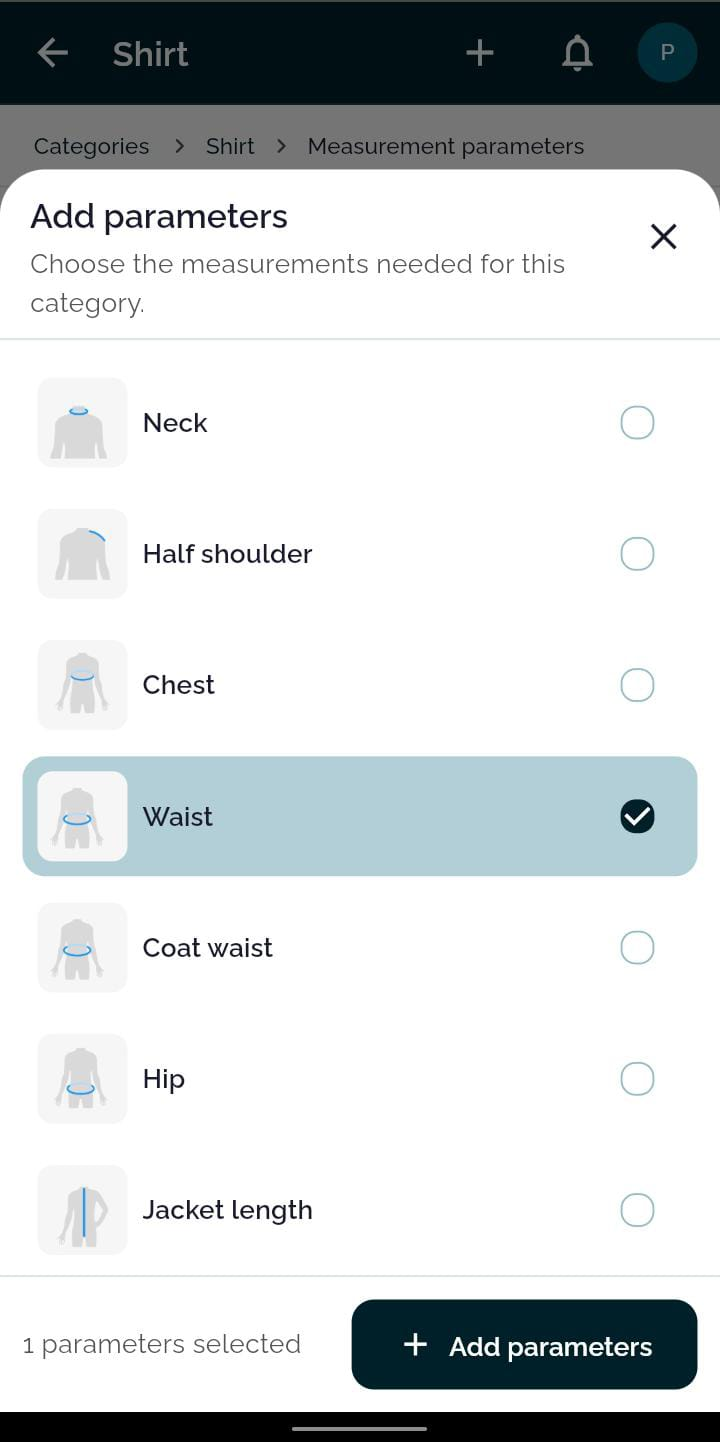
1. Pick Anatomical Points
Select required measurements from a rich visual catalog featuring body silhouette placement guides.

Say goodbye to dusty paper registers, ripped notebooks, and misplaced size slips. Record body dimensions with visual anatomical diagrams, auto-fill past measurements in one click, and tailor the measuring sequence to your workshop's natural rhythm.
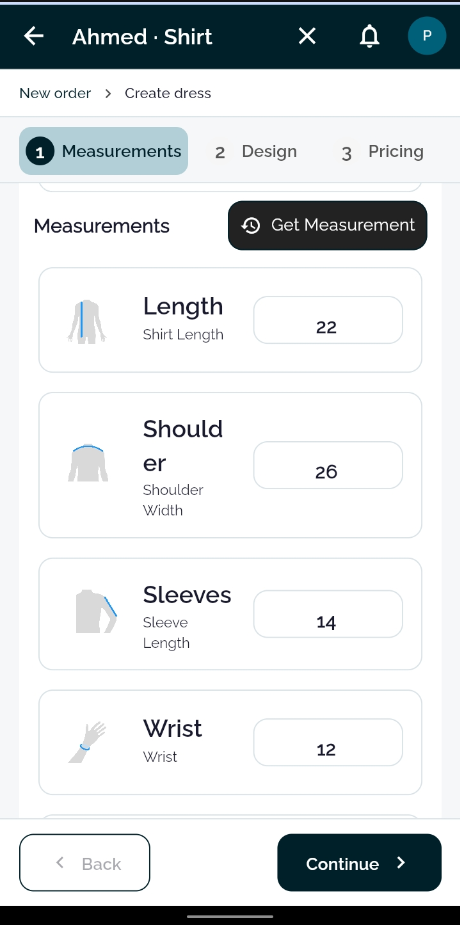
When a returning client comes to tailor another shirt or suit, don't waste 10 minutes hunting down their old page in a heavy ledger. Pull their exact fit in seconds.
Bespoke tailoring requires precision. TailorInch comes pre-loaded with an extensive library of anatomical measurement points for both Eastern and Western garments.
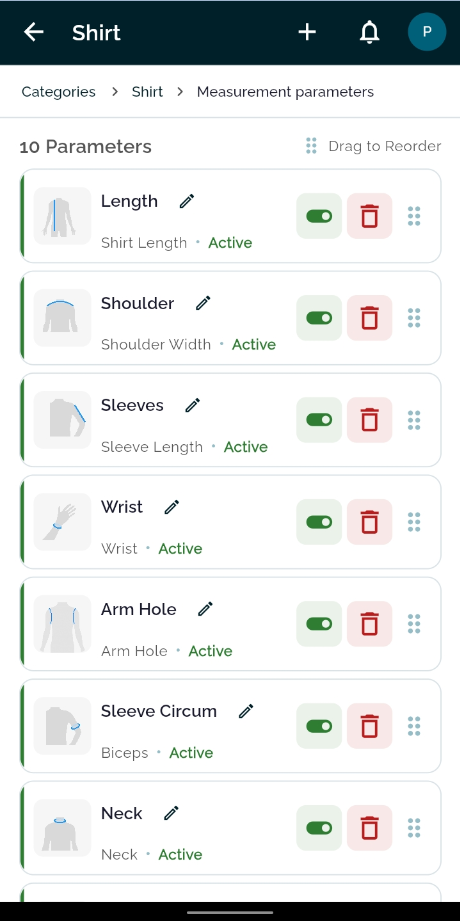
Every master cutter has their own habit when holding the measuring tape. TailorInch never forces you into an unnatural workflow—customize the field order to match your exact hands-on sequence.
From initial category setup to taking client measurements at the counter, experience an intuitive, zero-friction flow.
Select required measurements from a rich visual catalog featuring body silhouette placement guides.
Arrange parameters to mirror your tape measuring habit so counter data entry feels lightning fast.
Type numbers quickly on mobile or laptop. Tap 'Get Measurement' to populate past sizes for returning clients.
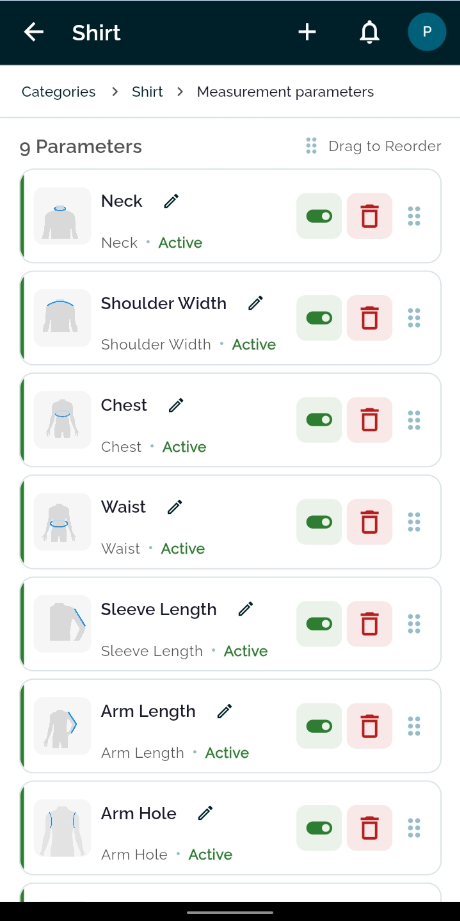
Toggle parameters active or inactive anytime, and customize labels to match your workshop's vocabulary.
Compare the day-to-day realities of traditional tailoring notebooks against a connected digital measurement system.
| Feature | Traditional Paper Notebooks | TailorInch Digital Measurement Book |
|---|---|---|
| Customer Search | ✕ 5 to 10 minutes flipping through hundreds of handwritten pages | ✓ Instant 2-second search by name, mobile number, or order code |
| Repeat Customer Orders | ✕ Re-measuring from scratch or hunting through old diary archives | ✓ 1-Tap 'Get Measurement' automatically pulls previous fitted dimensions |
| Visual Anatomic Guidance | ✕ Cryptic abbreviations that new tailors and apprentices misunderstand | ✓ Illustrated silhouette icons on every single parameter |
| Custom Order Sequence | ✕ Rigid pre-printed columns that rarely match your measuring habit | ✓ Drag-and-Drop Reordering to follow your natural measuring tape flow |
| Data Safety & Backup | ✕ High risk of tea spills, water damage, fire, or lost registers | ✓ Secure Cloud Storage synced across Android app, tablet, and Web |
| Workshop Sharing | ✕ Tearing off paper slips that get lost on the cutting table | ✓ Live sync to cutter & worker queues with full measurement visibility |
Everything you need to know about setting up and running your digital measurement book with TailorInch.
Yes. TailorInch supports standard inches, centimeters, and fractional measurements (e.g. 26.5 or 14 1/4) so you can record sizes exactly as your measuring tape reads.
When creating a new dress for a returning customer, tapping "Get Measurement" pulls up their latest recorded measurements for that specific garment category and auto-fills the fields. You can confirm them or tweak any single number if the client's fit has changed.
Yes. In the category parameters settings, you can simply drag and drop the measurement cards into whichever order matches the way you tape measure your clients (e.g. Neck first, then Shoulders, Chest, Waist, etc.).
Absolutely. You can select pre-made anatomical points from our visual library or create entirely custom parameters, rename existing labels into your workshop's local dialect, and toggle unused ones off.
Yes. Once an order is assigned, workshop cutters and tailors can view the complete measurement sheet directly within their 'My Tasks' worker panel on Android or web without carrying paper slips.
Set up your shop in under 2 minutes. No credit card required, pay only as you complete orders.